On x86 32-bit architecture, maximum addressable memory is 4GB.  This
addressable space is known as "virtual address space" and those addresses are
called "virtual addresses". Now to access physical memory, or more
specifically, to access a physical address, a virtual address must go through
the segmentation then paging system, known as the "mapping" process.

                         MMU
     virtual/   +----------------------+
        logical |  +----------------+  | logical is Intel terms
        ------->|  | Segmented Unit |  |
                |  +----------------+  |
                |          | linear    |
                |  +----------------+  |
                |  | Paging Unit    |  |
                |  +----------------+  |
                |          |           |
                +----------|-----------+
                           | physical
                           |
                           v


In order to access *any* physical pages, that page *must* be in the process's
page table - every process has its own page table. That is the base.

Now, there are two "less obvious" details worth pointing out: first, even it
is often said a process is "given" a unique 4GB virtual address space, it
doesn't really mean that the process can do whatever it wants in that space:
to access a paricular area inside that virtual space, it must ask kernel for a
so-called "valid" memory area for it - the corresponding data structure
defined in Linux is known as "vm_area_struct" or VMAs. You can check all VMAs
associated with a process through "pmap" command on a process id.

A second point is that even in theory, a process got the "potential" of
accessing 4GB space, but say a user-space application makes use of libc, then
libc should be mapped to the virtual space; the user-space application may
also make use of syscalls, that means kernel will work on behalf of this
process, so kernel image should also be mapped to process's virtual address
space: and this mapping is better be permanent, given how often a process
needs to switch to kernel mode. A temporary mapping scheme seems possible, but
doesn't make much sense.

To summarize, a 4GB virtual address space for a process needs to be split
between kernel and user space program: therefore the well-known 3G/1G split.
User space takes the 0-3GB, and kernel takes the 3GB-4GB.

Thus, in the 3G/1G split, kernel has the virtual address space of 1GB.
Remember that to access a physical address, you need a virtual address to
start with, even for kernel. So if you don't do anything special, the 1GB
virtual address effectively limits the physical space a kernel can access to
1GB. Okay, maybe this is a third less obvious detail: kernel _needs_ to access
*every* physical memory to make full use of it.

In the early days, where a machine's physical space is much less than 1GB, it
is OK, the whole physical memory is mapped to this 1GB virtual address.

       process address space

    4GB +---------------+
        |     512MB     |
        +---------------+ <------+     physical memory
        |     512MB     |        |
    3GB +---------------+ <--+   +---> +------------+
        |               |    |         |   512 MB   |
        |     /////     |    +-------> +------------+
        |               |
    0GB +---------------+

  Example: Physical address {x} is mapped in kernel address space, virtual
  address is {PAGE_OFFSET + x}, where PAGE_OFFSET is defined as 3GB in Linux
  kernel for the 3/1 split.

  Two general observations related to this:

  - When all physical memory can be directly mapped into virtual address
    space, those corresponding virtual addresses are also called "kernel
    logical address". These logical address can often be mapped to physical
    address through constant offset, 3GB for example.

  - The part of physical memory can be mapped into virtual space is also known
    as "Low Memory", conversely, those can't be mapped (say the portion over
    1GB) is known as High Memory. In above case, all 512MB is Low Memory.


Now you say, most machines got 2GB or more physical memory now. What happens
then? when you want to access physical memory above 1GB (or more precisely,
896MB), Linux kernel use 128 MB virtual address space to *temporarily* map
those virtual addresses to the physical address, thus to achieve the goal of
being able to access all physical pages. There are some details not clearly
spelled out here, for example, will be keep that 128 MB pre-allocated for this
temporary mapping etc. But I think at this point, we can safely skip those
over, and focus on the essential issue here: use temporal mapping to access
all physical memory. The following figure roughly illustrate the scheme:


                                           physical mem
       process address space    +------> +------------+
                                |        |  3200 M    |
                                |        |            |
    4GB +---------------+ <-----+        |  HIGH MEM  |
        |     128 MB    |                |            |
        +---------------+ <---------+    |            |
        +---------------+ <------+  |    |            |
        |     896 MB    |        |  +--> +------------+
    3GB +---------------+ <--+   +-----> +------------+
        |               |    |           |   896 MB   |
        |     /////     |    +---------> +------------+
        |               |
    0GB +---------------+


Putting this in Linux context: kmalloc() will return you a chunk of virtual
memory: yes, pointed by a virtual address, but more importantly, that is also
a kernel logical address, meaning it has direct mapping to *continuous"
physical pages.

vmalloc() is another kernel call that will return you a chunk of virtual
memory. However, this virtual memory is only continous on virtual space, it
may not be continous on physical space. Also, the actual mapped physical pages
can not only come from Low Memory, but also can come from High Memory,
especially when you are asking for a large chunk of it.


On 64-bit architecture
----------------------------------------------

On such architecture, the 3G/1G split doesn't apply anymore. Due to the huge
address space, you can easily pick a split scheme between user space and
kernel space, and still easily map the whole physical memory into kernel
address space.


C pointer address question
----------------------------------------------

A sorta interesting observation on C pointers: we can print a pointer address
in C. For a user-space application, if you print out the pointer address you
defined, it should be one of the virtual addresses out of the (0-3GB) range.

What about kernel? what if print a pointer address in kernel? is it always
from kernel address space? The answer is no ... since kernel *can* access user
space address, depending on the pointer, it can be from either.

How do you tell if it is from kernel or user space? Yes, if it fall into
0-3GB, then it is from user-space, otherwise, it is from kernel. The take-away
message here, either way, it is virtual address you are seeing.

Does it make sense?


In real world #1
----------------------------------------------

  $ cat /proc/iomem

  00100000-003205e3 : Kernel code
  003205e4-0041bdc3 : Kernel data
  0047d000-004f3aff : Kernel bss


  So the address shown here is physical, kernel code start out at 1G, and code
  portion of it is a bit over 2 MB.

  PAGE_OFFSET =  0xC8000000 = 3GB

  For a 512MB system, the virtual address for kernel will be from
  3GB ~ PAGE_OFFSET + 512MB

In real world #2
----------------------------------------------

From a user process point of view

    +----------------------+ <--- 0xBFFF FFFF (=3GB)
    | environment variable |
    |----------------------| <--- 0xBFFF FD0C
    | stacks (down grow)   |
    |          |           |
    |          v           |
    |----------------------|
    |                      |
    |     // free memory   |
    |                      |
    |                      |
    |----------------------| <--------------------
    |  myprogram.o         |                    |
    |----------------------|                    |
    |  mylib.o             |                    |
    |----------------------|              executable image
    |  myutil.o            |                    |
    |----------------------|                    |
    |  library code (libc) |                    |
    |----------------------| <--------------------
    |                      | 0x8000 0000 (=2GB)
    |                      |
    |  other memory        |
    |                      |
    +----------------------+

Thursday, August 4, 2016
Linux Addressing

Monday, July 25, 2016
Introduction to Linux Interrupts and CPU SMP Affinity
Interrupts are signal that are sent across IRQ (Interrupt Request Line) by a hardware or software.
Interrupts allow devices like keyboard, serial cards and parallel ports to indicate that it needs CPU attention.
Once the CPU receives the Interrupt Request, CPU will temporarily stop execution of running program and invoke a special program called Interrupt Handler or ISR (Interrupt Service Routine).
The Interrupt Service or Interrupt Handler Routine can be found in Interrupt Vector table that is located at fixed address in the memory. After the interrupt is handled CPU resumes the interrupted program.
The Interrupt Service or Interrupt Handler Routine can be found in Interrupt Vector table that is located at fixed address in the memory. After the interrupt is handled CPU resumes the interrupted program.
At boot time, system identifies all devices, and appropriate interrupt handlers are loaded into the interrupt table.
The following are two ways of requesting CPU attention:
- Interrupt based
- Polling based
All Linux based OS are interrupt driven.
When we press a key on keyboard, keyboards says to CPU that a key has been pressed. But CPU can be busy processing some stuff from RAM, System Clock, NIC card, may be video or PCI bus. In that case Keyboard places a voltage on IRQ line assigned to that hardware, here in this case [Keyboard]. This change in voltage serves as request from device saying that device has a request that needs processing.
/proc/interrupts File
On a Linux machine, the file /proc/interrupts contains information about the interrupts in use and how many times processor has been interrupted
# cat /proc/interrupts
           CPU0   CPU1  CPU2  CPU3
  0: 3710374484      0     0     0  IO-APIC-edge  timer
  1:         20      0     0     0  IO-APIC-edge  i8042
  6:          5      0     0     0  IO-APIC-edge  floppy
  7:          0      0     0     0  IO-APIC-edge  parport0
  8:          0      0     0     0  IO-APIC-edge  rtc
  9:          0      0     0     0  IO-APIC-level  acpi
 12:        240      0     0     0  IO-APIC-edge  i8042
 14:   11200026      0     0     0  IO-APIC-edge  ide0
 51:   61281329      0     0     0  IO-APIC-level  ioc0
 59:          1      0     0     0  IO-APIC-level  vmci
 67:   19386473      0     0     0  IO-APIC-level  eth0
 75:   94595340      0     0     0  IO-APIC-level  eth1
NMI:          0      0     0     0
LOC: 3737150067 3737142382 3737145101 3737144204
ERR:          0
MIS:          0
In the above file:
- The first Column is the IRQ number.
- The Second column says how many times the CPU core has been interrupted. In the above example timer is interrupt name [System clock] and 3710374484 is the number of times CPU0 has been interrupted. I8042 is Keyboard controller that controls PS/2 keyboards and mouse in Pc’s.
- For interrupt like rtc [Real time clock] CPU has not being interrupted. RTC are present in electronic devices to keep track of time.
- NMI and LOC are drivers used on system that are not accessible/configured by user.
IRQ number determines the priority of the interrupt that needs to be handled by the CPU.
A small IRQ number value means higher priority.
For example if CPU receives interrupt from Keyboard and system clock simultaneously. CPU will serve System Clock first since it has IRQ number 0.
- IRQ 0 — system timer (cannot be changed);
- IRQ 1 — keyboard controller (cannot be changed)
- IRQ 3 — serial port controller for serial port 2 (shared with serial port 4, if present);
- IRQ 4 — serial port controller for serial port 1 (shared with serial port 3, if present);
- IRQ 5 — parallel port 2 and 3 or sound card;
- IRQ 6 — floppy disk controller;
- IRQ 7 — parallel port 1. It is used for printers or for any parallel port if a printer is not present.
For devices like joystick CPU doesn’t wait for the device to send interrupt. Since Joystick used for gaming and the movement of joystick will be fast it will be ideal to use polling and check whether device needs attention. The disadvantage behind this method is CPU can get into busy wait, checking the device many times.
On a related note, it is also essential to handle the signals properly in Linux.
Hardware Interrupts
All of the above discussed scenarios are example of Hardware interrupts.
Hardware interrupts are further classified into two major categories:
- Non-maskable interrupts [NMI]: As the name suggests these types of interrupts cannot be ignored or suppressed by the CPU. MNI’s are send over separate interrupt line and it’s generally used for critical hardware errors like memory error, Hardware traps indicating Fan failure, Temperature Sensor failure etc.
- Maskable interrupts: These interrupts can be ignored or delayed by CPU. The Interrupt Mask Register masks the interrupts being triggered on external pins of cache controller. Setting a bit by writing a 0, disables the interrupt triggering on the pin
Software Interrupts
These interrupts are generated when the CPU executes an instruction which can cause an exception condition in the CPU [ALU unit] itself.
For example, divide a number by zero which is not possible, it will lead to divide-by-zero exception, causing the computer to abandon the calculation or display an error message.
The file /proc/stat is also a file part of the /proc filesystem, which has information about system kernel statistics, also holds some interrupt information.
# cat /proc/stat
cpu  17028082 5536753 5081493 1735530500 42592308 90006 479750 0
cpu0 5769176 1170683 1495750 403368354 39406374 90006 284864 0
cpu1 3714389 1451937 1186134 444082258 1084780 0 64876 0
cpu2 3791544 1471013 1211868 443988514 1056981 0 64764 0
cpu3 3752971 1443119 1187740 444091373 1044172 0 65244 0
intr 417756956 --- Output Truncated
The line intr shows the count of the interrupt serviced since boot time. The first column is total of all interrupts serviced. Each subsequent column is the total for a particular interrupt.
SMP_AFFINITY
Symmetric multiprocessing is the processing of programs by multiple processors.
smp_affinity file holds interrupt affinity value for a IRQ number. The smp_affinity file associated with each IRQ number is stored in /proc/irq/IRQ_NUMBER/smp_affinity file. The value in the file is stored in hexadecimal bit-mask representing all CPU cores in the system. smp_affinity works for device that has IO-APIC enabled device drivers.
For example, smp_affinity entry for Ethernet driver is shown below:
grep eth0 /proc/interrupts
67: 23834931 0 0 0 IO-APIC-level eth0
IRQ number for eth0 is 67 and corresponding smp_affinity file is located at:
cat /proc/irq/67/smp_affinity
00000000,00000000,00000000,00000000,00000000,00000000,00000000,00000001
The decimal equivalent for value ‘000000001’ is ‘1’. ie All the interrupt related to Ethernet driver will be serviced by CPU0.
We can manually change the processor affinity by changing values in smp_affinity file for a particular controller or by using irqbalance.
Monday, March 21, 2016
Atheros chipset overview
Hardware Overview
The Atheros 802.11 NIC is, at it's core, a DMA engine with hardware timers implementing the 802.11 packet timing. The hardware handles doing the OFDM/CCK RF encoding and decoding.
General Overview
The NIC can be broken down into a few larger blocks:
- The MAC - implements the 802.11 packet timing, encryption/decryption, packet scheduling, DMA and queuing
- The PHY - implements the 802.11 packet encoding and decoding.
- The radio (analog) - implements the 2.4GHz / 5GHz radio.
- Power control / RTC - handling turning on and off power and clock generation to various parts of the device
- Host interface - the glue between the internal AHB and whatever the host supports - PCI, PCIe, etc
MAC
The MAC side is further broken down into:
- PCU - packet control unit. This handles handles packet reception.
- QCU - queue control unit. This handles packet transmission DMA.
- DCU - (?) control unit. This handles the 802.11 side of packet transmission - contention window management, QoS settings, etc.
- FIFOs - there's a TX and an RX FIFO.
The MAC itself implements (not an exhaustive list!):
- contention window and backoff timers
- RTS generation, CTS-to-self generation, CTS response
- ACK response
- Block-ACK response on 802.11n hardware
- Beacon generation
- On later chips, it supports waking up the hardware when it sees various things - WoW packets, TIM bit set for itself, etc
- Transmit and receive DMA
- Interrupt generation
- MIB counters - TX frame, RX frame, RX clear, cycle timers
PHY
The PHY implements the packet encoding and decoding. The MAC selects packets to send to the PHY for transmission; the PHY decodes packets from the air and sends them to the MAC for reception. (Yes, the Atheros NIC drivers do no actual packet encoding/decoding in software - the hardware does all of this. It's not a software defined radio.)
It is also responsible for watching the air and determining when the air is clear enough to transmit. The MAC has an input (RX_CLEAR) which it uses to determine whether it's able to transmit or not.
The PHY has one (or more, for later chips) ADCs and DACs which handle receiving and transmitting encoding frames to the analog section.
Analog
The Analog section links into the PHY via the ADCs and DACs. It's responsible for tuning to the relevant 2 or 5GHz frequency and converting things as needed.
Chipset specifics
AR5210
The MAC supports:
- One RX queue
- Two TX queues (data / beacon?)
- 5GHz OFDM only transmit and receive
- Open, WEP encryption
- Station, AP, Ad-hoc configuration
The AR5210 requires an external analog chip (RF5110) which handles the 5GHz conversion.
AR5211
The AR5211 MAC supports:
- One RX queue
- Four(?) TX queues
- OFDM _or_ CCK operation - it doesn't automatically switch between both
- Open, WEP, WPA encryption schemes
- Station, AP, Ad-hoc configuration
The AR5211 requires an external analog chip. There were two made: RF5111 for 5GHz operation and RF2111 for 2GHz operation. The driver would configure which analog chip was active.
Since the decoder can't automatically determine the difference between OFDM and CCK on received frames, the AR5211 doesn't support 802.11bg operation. It either supports 802.11b operation (CCK) or 802.11g operation (OFDM) or 802.11a operation (OFDM). This is why madwifi/net80211 supported the concept of "PUREG" - OFDM-only in 2GHz.
AR5212 and related 802.11abg NICs
The AR5212 MAC supports:
- One RX queue
- 10 TX queues - 8 data, 1 beacon, one CAB (content-after-beacon)
- OFDM, CCK operation - the PHY now supports "voting" on which decoder matched the received preamble and can choose between OFDM and CCK
- Open, WEP, WPA encryption schemes
- Station, AP, Ad-hoc configuration.
The AR5212 is the first to support automatic OFDM/CCK detection on received packets. This allows it to operate as an 802.11bg aware device (ie, OFDM and CCK on a 2GHz channel.)
The 10 TX queues allow for separate WMM parameters for each of the 8 WMM QoS levels.
AR5416 and later 802.11n NICs
(TODO)
AR7010
The AR7010 isn't a wireless device - it's a Tensilica core with a USB, Ethernet and PCIe to connect to various devices. The most popular core - AR7010 - has a USB target mode interface, a PCIe interface to connect to an Atheros wireless NIC, and onboard RAM/flash. Other options were available (Ethernet, PCIe to connect to the host.)
AR9271
The AR9271 can be viewed as an AR7010 style device with an AR9285 NIC on-die.
Thursday, November 26, 2015
TCP/IP Address Resolution For IP Multicast Addresses
Like most discussions of address resolution, the preceding sections all focus on unicast communication, where a datagram is sent from one source device to one destination device. Whether direct mapping or dynamic resolution is used for resolving a network layer address, it is a relatively simple matter to resolve addresses when there is only one intended recipient of the datagram. TCP/IP uses ARP for its dynamic resolution scheme, which is designed for unicast resolution only.
However, the Internet Protocol also supports multicasting of datagrams, as I explain in the topics on IP multicasting and IP multicast addressing. In this situation, the datagram must be sent to multiple recipients, which complicates matters considerably. We need to establish a relationship of some sort between the IP multicast group address and the addresses of the devices at the data link layer. We could do this by converting the IP multicast datagram to individual unicast transmissions at the data link layer, each using ARP for resolution, but this would be horribly inefficient.
When possible, IP makes use of the multicast addressing and delivery capabilities of the underlying network to deliver multicast datagrams on a physical network. Perhaps surprisingly, even though ARP employs dynamic resolution, multicast address resolution is done using a version of the direct mapping technique. By defining a mapping between IP multicast groups and data link layer multicast groups we enable physical devices to know when to pay attention to multicasted datagrams.
The most commonly used multicast-capable data link addressing scheme is the IEEE 802 addressing system best known for it use in Ethernet networks. These data link layer addresses have 48 bits, arranged into two blocks of 24. The upper 24 bits are arranged into a block called the organizationally unique identifier (OUI), with different values assigned to individual organizations; the lower 24 bits are then used for specific devices.
The Internet Assigned Number Authority (IANA) itself has an OUI that it uses for mapping multicast addresses to IEEE 802 addresses. This OUI is "01:00:5E". To form a mapping for Ethernet, 24 bits are used for this OUI and the 25th (of the 48) is always zero. This leaves 23 bits of the original 48 to encode the multicast address. To do the mapping, the lower-order 23 bits of the multicast address are used as the last 23 bits of the Ethernet address starting with "01:00:5E" for sending the multicast message. This process is illustrated in Figure 51.

Figure 51: Mapping of Multicast IP Addresses to IEEE 802 Multicast MAC Addresses
IP multicast addresses consist of the bit string “1110” followed by a 28-bit multicast group address. To create a 48-bit multicast IEEE 802 (Ethernet) address, the top 24 bits are filled in with the IANA’s multicast OUI, 01-00-5E, the 25th bit is zero, and the bottom 23 bits of the multicast group are put into the bottom 23 bits of the MAC address. This leaves 5 bits (shown in pink) that are not mapped to the MAC address, meaning that 32 different IP addresses may have the same mapped multicast MAC address.
Monday, November 2, 2015
Kmalloc: Which Flag to Use When
Which Flag to Use When
Situation Solution
Process context, can sleep Use GFP_KERNEL
Process context, cannot sleep Use GFP_ATOMIC, or perform your allocations
with GFP_KERNEL at an earlier or later point
when you can sleep.
Interrupt handler Use GFP_ATOMIC
Softirq Use GFP_ATOMIC
Tasklet Use GFP_ATOMIC
Need DMA-able memory, can sleep Use (GFP_DMA | GFP_KERNEL)
Need DMA-able memory, cannot sleep Use (GFP_DMA | GFP_ATOMIC), or perform your
allocation at an earlier point when you can sleep
Tuesday, October 13, 2015
Why Data Alignment Required??
Data Alignment:
Every data type in C/C++ will have alignment requirement (infact it is mandated by processor architecture, not by language). A processor will have processing word length as that of data bus size. On a 32 bit machine, the processing word size will be 4 bytes.
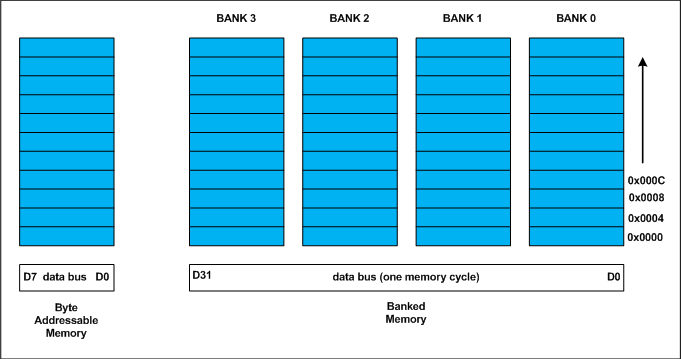
Historically memory is byte addressable and arranged sequentially. If the memory is arranged as single bank of one byte width, the processor needs to issue 4 memory read cycles to fetch an integer. It is more economical to read all 4 bytes of integer in one memory cycle. To take such advantage, the memory will be arranged as group of 4 banks as shown in the above figure.
The memory addressing still be sequential. If bank 0 occupies an address X, bank 1, bank 2 and bank 3 will be at (X + 1), (X + 2) and (X + 3) addresses. If an integer of 4 bytes is allocated on X address (X is multiple of 4), the processor needs only one memory cycle to read entire integer.
Where as, if the integer is allocated at an address other than multiple of 4, it spans across two rows of the banks as shown in the below figure. Such an integer requires two memory read cycle to fetch the data.
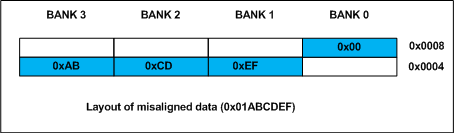
A variable’s data alignment deals with the way the data stored in these banks. For example, the natural alignment of int on 32-bit machine is 4 bytes. When a data type is naturally aligned, the CPU fetches it in minimum read cycles.
Similarly, the natural alignment of short int is 2 bytes. It means, a short int can be stored in bank 0 – bank 1 pair or bank 2 – bank 3 pair. A double requires 8 bytes, and occupies two rows in the memory banks. Any misalignment of double will force more than two read cycles to fetch double data.
Note that a double variable will be allocated on 8 byte boundary on 32 bit machine and requires two memory read cycles. On a 64 bit machine, based on number of banks, double variable will be allocated on 8 byte boundary and requires only one memory read cycle.
Structure Padding:
In C/C++ a structures are used as data pack. It doesn’t provide any data encapsulation or data hiding features (C++ case is an exception due to its semantic similarity with classes).
Because of the alignment requirements of various data types, every member of structure should be naturally aligned. The members of structure allocated sequentially increasing order. Let us analyze each struct declared in the above program.
Thursday, October 8, 2015
Quick overview of tasklets
Tasklets
Tasklets are a bottom-half mechanism built on top of softirqs. As already mentioned, they have nothing to do with tasks. Tasklets are similar in nature and work in a similar manner to softirqs; however, they have a simpler interface and relaxed locking rules.
The decision between whether to use softirqs versus tasklets is simple: You usually want to use tasklets. As we saw in the previous section, you can count on one hand the users of softirqs. Softirqs are required only for very high-frequency and highly threaded uses. Tasklets, on the other hand, see much greater use. Tasklets work just fine for the vast majority of cases and they are very easy to use.
Implementation of Tasklets
Because tasklets are implemented on top of softirqs, they are softirqs. As discussed, tasklets are represented by two softirqs: HI_SOFTIRQ and TASKLET_SOFTIRQ. The only real difference in these types is that the HI_SOFTIRQ-based tasklets run prior to the TASKLET_SOFTIRQ tasklets.
The Tasklet Structure
Tasklets are represented by the tasklet_struct structure. Each structure represents a unique tasklet. The structure is declared in <linux/interrupt.h>:
struct tasklet_struct {
        struct tasklet_struct *next;  /* next tasklet in the list */
        unsigned long state;          /* state of the tasklet */
        atomic_t count;               /* reference counter */
        void (*func)(unsigned long);  /* tasklet handler function */
        unsigned long data;           /* argument to the tasklet function */
};
The func member is the tasklet handler (the equivalent of action to a softirq) and it receives data as its sole argument.
The state member is one of zero, TASKLET_STATE_SCHED, or TASKLET_STATE_RUN. TASKLET_STATE_SCHED denotes a tasklet that is scheduled to run and TASKLET_STATE_RUN denotes a tasklet that is running. As an optimization,TASKLET_STATE_RUN is used only on multiprocessor machines because a uniprocessor machine always knows whether the tasklet is running (it is either the currently executing code, or not).
The count field is used as a reference count for the tasklet. If it is nonzero, the tasklet is disabled and cannot run; if it is zero, the tasklet is enabled and can run if marked pending.
Scheduling Tasklets
Scheduled tasklets (the equivalent of raised softirqs)[5] are stored in two per-processor structures: tasklet_vec (for regular tasklets) and tasklet_hi_vec (for high-priority tasklets). Both of these structures are linked lists oftasklet_struct structures. Each tasklet_struct structure in the list represents a different tasklet.
Tasklets are scheduled via the tasklet_schedule() and tasklet_hi_schedule() functions, which receive a pointer to the tasklet's tasklet_struct as their lone argument. The two functions are very similar (the difference being that one uses TASKLET_SOFTIRQ and one uses HI_SOFTIRQ). Writing and using tasklets is covered in the next section. For now, let's look at the details of tasklet_schedule():
At the next earliest convenience, do_softirq() is run as discussed in the previous section. Because most tasklets and softirqs are marked pending in interrupt handlers, do_softirq() most likely runs when the last interrupt returns. Because TASKLET_SOFTIRQ or HI_SOFTIRQ is now raised, do_softirq() executes the associated handlers. These handlers, tasklet_action() and tasklet_hi_action(), are the heart of tasklet processing. Let's look at what they do:
The implementation of tasklets is simple, but rather clever. As you saw, all tasklets are multiplexed on top of two softirqs, HI_SOFTIRQ and TASKLET_SOFTIRQ. When a tasklet is scheduled, the kernel raises one of these softirqs. These softirqs, in turn, are handled by special functions that then run any scheduled tasklets. The special functions ensure that only one tasklet of a given type is running at the same time (but other tasklets can run simultaneously). All this complexity is then hidden behind a clean and simple interface.
Using Tasklets
In most cases, tasklets are the preferred mechanism with which to implement your bottom half for a normal hardware device. Tasklets are dynamically created, easy to use, and very quick. Moreover, although their name is mind-numbingly confusing, it grows on you: It is cute.
Declaring Your Tasklet
You can create tasklets statically or dynamically. What option you choose depends on whether you have (or want) a direct or indirect reference to the tasklet. If you are going to statically create the tasklet (and thus have a direct reference to it), use one of two macros in <linux/interrupt.h>:
DECLARE_TASKLET(name, func, data)
DECLARE_TASKLET_DISABLED(name, func, data);
Both these macros statically create a struct tasklet_struct with the given name. When the tasklet is scheduled, the given function func is executed and passed the argument data. The difference between the two macros is the initial reference count. The first macro creates the tasklet with a count of zero, and the tasklet is enabled. The second macro sets count to one, and the tasklet is disabled. Here is an example:
DECLARE_TASKLET(my_tasklet, my_tasklet_handler, dev);
This line is equivalent to
struct tasklet_struct my_tasklet = { NULL, 0, ATOMIC_INIT(0),
                                     my_tasklet_handler, dev };
This creates a tasklet named my_tasklet that is enabled with tasklet_handler as its handler. The value of dev is passed to the handler when it is executed.
To initialize a tasklet given an indirect reference (a pointer) to a dynamically created struct tasklet_struct, t, call tasklet_init():
tasklet_init(t, tasklet_handler, dev); /* dynamically as opposed to statically */ Writing Your Tasklet Handlervoid tasklet_handler(unsigned long data)
As with softirqs, tasklets cannot sleep. This means you cannot use semaphores or other blocking functions in a tasklet. Tasklets also run with all interrupts enabled, so you must take precautions (for example, disable interrupts and obtain a lock) if your tasklet shares data with an interrupt handler. Unlike softirqs, however, two of the same tasklets never run concurrentlyalthough two different tasklets can run at the same time on two different processors. If your tasklet shares data with another tasklet or softirq, you need to use proper locking (see Chapter 8, "Kernel Synchronization Introduction," and Chapter 9, "Kernel Synchronization Methods").
Scheduling Your Tasklet
To schedule a tasklet for execution, tasklet_schedule() is called and passed a pointer to the relevant tasklet_struct:
tasklet_schedule(&my_tasklet); /* mark my_tasklet as pending */
After a tasklet is scheduled, it runs once at some time in the near future. If the same tasklet is scheduled again, before it has had a chance to run, it still runs only once. If it is already running, for example on another processor, the tasklet is rescheduled and runs again. As an optimization, a tasklet always runs on the processor that scheduled itmaking better use of the processor's cache, you hope.
You can disable a tasklet via a call to tasklet_disable(), which disables the given tasklet. If the tasklet is currently running, the function will not return until it finishes executing. Alternatively, you can usetasklet_disable_nosync(), which disables the given tasklet but does not wait for the tasklet to complete prior to returning. This is usually not safe because you cannot assume the tasklet is not still running. A call totasklet_enable() enables the tasklet. This function also must be called before a tasklet created with DECLARE_TASKLET_DISABLED() is usable. For example:
tasklet_disable(&my_tasklet);    /* tasklet is now disabled */

/* we can now do stuff knowing that the tasklet cannot run .. */

tasklet_enable(&my_tasklet);     /* tasklet is now enabled */
You can remove a tasklet from the pending queue via tasklet_kill(). This function receives a pointer as a lone argument to the tasklet's tasklet_struct. Removing a scheduled tasklet from the queue is useful when dealing with a tasklet that often reschedules itself. This function first waits for the tasklet to finish executing and then it removes the tasklet from the queue. Nothing stops some other code from rescheduling the tasklet, of course. This function must not be used from interrupt context because it sleeps.
ksoftirqd
Softirq (and thus tasklet) processing is aided by a set of per-processor kernel threads. These kernel threads help in the processing of softirqs when the system is overwhelmed with softirqs.
As already described, the kernel processes softirqs in a number of places, most commonly on return from handling an interrupt. Softirqs might be raised at very high rates (such as during intense network traffic). Further, softirq functions can reactivate themselves. That is, while running, a softirq can raise itself so that it runs again (indeed, the networking subsystem does this). The possibility of a high frequency of softirqs in conjunction with their capability to remark themselves active can result in user-space programs being starved of processor time. Not processing the reactivated softirqs in a timely manner, however, is unacceptable. When softirqs were first designed, this caused a dilemma that needed fixing, and neither obvious solution was a good one. First, let's look at each of the two obvious solutions.
The first solution is simply to keep processing softirqs as they come in and to recheck and reprocess any pending softirqs before returning. This ensures that the kernel processes softirqs in a timely manner and, most importantly, that any reactivated softirqs are also immediately processed. The problem lies in high load environments, in which many softirqs occur, that continually reactivate themselves. The kernel might continually service softirqs without accomplishing much else. User-space is neglectedindeed, nothing but softirqs and interrupt handlers run and, in turn, the system's users get mad. This approach might work fine if the system is never under intense load; if the system experiences even moderate interrupt levels this solution is not acceptable. User-space cannot be starved for significant periods.
The second solution is not to handle reactivated softirqs. On return from interrupt, the kernel merely looks at all pending softirqs and executes them as normal. If any softirqs reactivate themselves, however, they will not run until the next time the kernel handles pending softirqs. This is most likely not until the next interrupt occurs, which can equate to a lengthy amount of time before any new (or reactivated) softirqs are executed. Worse, on an otherwise idle system it is beneficial to process the softirqs right away. Unfortunately, this approach is oblivious to which processes may or may not be runnable. Therefore, although this method prevents starving user-space, it does starve the softirqs, and it does not take good advantage of an idle system.
In designing softirqs, the developers realized that some sort of compromise was needed. The solution ultimately implemented in the kernel is to not immediately process reactivated softirqs. Instead, if the number of softirqs grows excessive, the kernel wakes up a family of kernel threads to handle the load. The kernel threads run with the lowest possible priority (nice value of 19), which ensures they do not run in lieu of anything important. This concession prevents heavy softirq activity from completely starving user-space of processor time. Conversely, it also ensures that "excess" softirqs do run eventually. Finally, this solution has the added property that on an idle system, the softirqs are handled rather quickly (because the kernel threads will schedule immediately).
There is one thread per processor. The threads are each named ksoftirqd/n where n is the processor number. On a two-processor system, you would have ksoftirqd/0 and ksoftirqd/1. Having a thread on each processor ensures an idle processor, if available, is always able to service softirqs. After the threads are initialized, they run a tight loop similar to this:
for (;;) {
        if (!softirq_pending(cpu))
                schedule();

        set_current_state(TASK_RUNNING);

        while (softirq_pending(cpu)) {
                do_softirq();
                if (need_resched())
                    schedule();
        }

        set_current_state(TASK_INTERRUPTIBLE);
}
If any softirqs are pending (as reported by softirq_pending()), ksoftirqd calls do_softirq() to handle them. Note that it does this repeatedly to handle any reactivated softirqs, too. After each iteration, schedule() is called if needed, to allow more important processes to run. After all processing is complete, the kernel thread sets itself TASK_INTERRUPTIBLE and invokes the scheduler to select a new runnable process.
The softirq kernel threads are awakened whenever do_softirq() detects an executed kernel thread reactivating itself.
|
Subscribe to:
Posts (Atom)